Wednesday, June 2, 2010
Media framework change in Froyo
Here is a Google I/O session by Dave Sparks, who talked about new APIs of media framework introduced in Froyo, and also some light on the future of Stagefright, OpenCORE, etc in the Q&A section.

Wednesday, February 3, 2010
Analyze memory leak of Android native process
Android libc_debug.so has a built-in function to dump all heap allocations with its backtrace, which is very useful to debug memory leaks of native processes. Below are the steps summarized during my investigation of mediaserver process:
In Froyo release, there is no need to replace libc.so with libc_debug.so. Try below steps instead of original step 2:
[Update: 06/22/2013]
Actually Android has a built-in service which could dump mediaserver's memory directly, so you can replace memorydumper related steps with below command. Sorry that I wasn't aware of this tool when I wrote this article :)
#dumpsys "media.player" -m
- apply the patch in ./frameworks/base, which registers a memory dumper service in mediaserver process, then rebuild
- (*)flash new system.img, replace libc.so with libc_debug.so, then reboot
- $ adb remount
- $ adb shell mv /system/lib/libc_debug.so /system/lib/libc.so
- $ adb reboot
- run memorydumper to get the initial heap allocations of mediaserver process
- $ adb shell /system/bin/memorydumper
- play several files, save the process maps during playback, then get the memory dump again
- $ adb pull /proc/
<mediaserver_pid>/maps . - $ adb shell /system/bin/memorydumper
- $ adb pull /proc/
- get the diff file of memory allocations
- $ adb pull /data/memstatus_1136.0 .
- $ adb pull /data/memstatus_1136.1 .
- $ diff memstatus_1136.0 memstatus_1136.1 >diff_0_1
- run the script to resolve symbols from the backtrace addresses in the diff file
- $ ./addr2func.py --root-dir=../ --maps-file=./maps diff_0_1
In Froyo release, there is no need to replace libc.so with libc_debug.so. Try below steps instead of original step 2:
- adb shell setprop libc.debug.malloc 1
- adb shell ps mediaserver
- adb shell kill <mediaserver_pid>
[Update: 06/22/2013]
Actually Android has a built-in service which could dump mediaserver's memory directly, so you can replace memorydumper related steps with below command. Sorry that I wasn't aware of this tool when I wrote this article :)
#dumpsys "media.player" -m
Tuesday, January 5, 2010
Current status of Stagefright
- Local file playback (AMR/MP3/MP4/...) and basic http playback support;
- Video only recording;
- A corresponding metadata retriever, not fully implemented yet.
- No abstraction layer for media sink, and lack of a pluggable mechanism to pick decoder dynamically based on the source's format and sink's capability. The overall architecture doesn't seem to be flexible enough to date;
- It's good to re-use the same MediaExtractor from player engine for metadata retrieving to avoid duplication. However, MediaExtractor itself might not get all required keys reliably, e.g. it might be more accurate to get some keys (e.g, video height/width) from decoder's output;
- To support audio only and audio+video recording;
- Http support is not complete, no BUFFERING status update, not asynchronous message for data insufficient/available;
- No RTSP support yet.
Monday, January 4, 2010
An overview of Stagefright player
There is a new playback engine implemented by Google comes with Android 2.0 (i.e, Stagefright), which seems to be quite simple and straightforward compared with the OpenCORE solution.
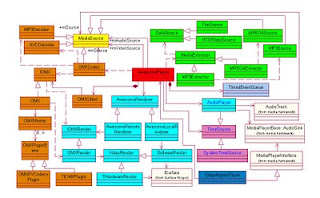
- MediaExtractor is responsible for retrieving track data and the corresponding meta data from the underlying file system or http stream;
- Leveraging OMX for decoding: there are two OMX plugins currently, adapting to PV's software codec and vendor's hardware implementation respectively. And there is a local implementation of software codecs which encapsulates PV's decoder APIs directly;
- AudioPlayer is responsible for rendering audio, it also provides the timebase for timing and A/V synchronization whenever audio track is present;
- Depending on which codec is picked, a local or remote render will be created for video rendering; and system clock is used as the timebase for video only playback;
- AwesomePlayer works as the engine to coordinate the above modules, and is finally connected into android media framework through the adapter of StagefrightPlayer.

Tuesday, October 27, 2009

Thursday, September 17, 2009
Fix syntax highlighter in the blogger template
Sep-17th - It seems syntax highlighter has updated, so my code snippet is in a mess again:(
Sep-30th:
Revert to R92. Change the template as following:
Sep-30th:
Revert to R92. Change the template as following:
<link href='http://flash-host.com.br/blog/sh/SyntaxHighlighter.css' rel='stylesheet' type='text/css'/>
<script language='javascript' src='http://syntaxhighlighter.googlecode.com/svn-history/r92/trunk/Scripts/shCore.js'/>
<script language='javascript' src='http://syntaxhighlighter.googlecode.com/svn-history/r92/trunk/Scripts/shBrushCSharp.js'/>
<script language='javascript' src='http://syntaxhighlighter.googlecode.com/svn-history/r92/trunk/Scripts/shBrushXml.js'/>
<script language='javascript' src='http://syntaxhighlighter.googlecode.com/svn-history/r92/trunk/Scripts/shBrushPython.js'/>
<script language='javascript' src='http://syntaxhighlighter.googlecode.com/svn-history/r92/trunk/Scripts/shBrushJScript.js'/>
<script language='javascript' src='http://syntaxhighlighter.googlecode.com/svn-history/r92/trunk/Scripts/shBrushCpp.js'/>
<script language='javascript' src='http://syntaxhighlighter.googlecode.com/svn-history/r92/trunk/Scripts/shBrushBash.js'/>
<script language='javascript'>

  dp.SyntaxHighlighter.BloggerMode();
  dp.SyntaxHighlighter.HighlightAll('code');

</script>
Tuesday, July 7, 2009
Opencore logs and releases
1. Enable Opencore 2.0x logs:
1)At compilation time, add the marco ENABLE_PV_LOGGING=1
$ cd <android_home>
$ touch external/opencore/oscl/oscl/osclbase/src/pvlogger.h
$ make ENABLE_PV_LOGGING=1
2)At runtime, /sdcard/pvlogger.txt is used to specify enabled log level and related tags. (write 8 alone in it will enable all pv logs.) Below is extracted from external/opencore/android/android_logger_config.h:
/*
To configure logging at runtime, a file pvlogger.txt must be located in the sdcard.
The format for log level and logger tag in the file should be: "level,node". Note that there should be no space between log level and logger tag.
For example, pvlogger.txt can look like:
1,PVPlayerEngine
8,PVSocketNode
Above example means log the message level PVLOGMSG_ALERT for PVPlayerEngine and PVLOGMSG_DEBUG for PVSocketNode. See pvlogger.h for log level values.
*/
2. Enable Opencore 1.0 logs:
1)Change external/opencore/oscl/pvlogger/src/pvlogger.h:
/* Release mode-- No logging */
#define PVLOGGER_INST_LEVEL 0 ---- Change this value to 5
2)Change external/opencore/android/thread_init.cpp:
#if 0 --------- Change this value to 1
PVLoggerAppender *appender = new
AndroidLogAppender();
...
...
#endif
3)Rebuild android source.
PV Releases:
PV2.04: http://groups.google.com/group/android-framework/browse_thread/thread/ccec12e4fe876149/17254e4a88875a6b
PV2.02: http://groups.google.com/group/android-framework/browse_thread/thread/8b72bdad6ca508e/33033406a6b2e0d0
PV2.01: http://groups.google.com/group/android-framework/browse_thread/thread/5712f642dbee9398/f943ebc7ec02bb18
PV2.0: http://groups.google.com/group/android-framework/browse_thread/thread/92e10684c6f09e16/8df445f867c19f2e
1)At compilation time, add the marco ENABLE_PV_LOGGING=1
$ cd <android_home>
$ touch external/opencore/oscl/oscl/osclbase/src/pvlogger.h
$ make ENABLE_PV_LOGGING=1
2)At runtime, /sdcard/pvlogger.txt is used to specify enabled log level and related tags. (write 8 alone in it will enable all pv logs.) Below is extracted from external/opencore/android/android_logger_config.h:
/*
To configure logging at runtime, a file pvlogger.txt must be located in the sdcard.
The format for log level and logger tag in the file should be: "level,node". Note that there should be no space between log level and logger tag.
For example, pvlogger.txt can look like:
1,PVPlayerEngine
8,PVSocketNode
Above example means log the message level PVLOGMSG_ALERT for PVPlayerEngine and PVLOGMSG_DEBUG for PVSocketNode. See pvlogger.h for log level values.
*/
2. Enable Opencore 1.0 logs:
1)Change external/opencore/oscl/pvlogger/src/pvlogger.h:
/* Release mode-- No logging */
#define PVLOGGER_INST_LEVEL 0 ---- Change this value to 5
2)Change external/opencore/android/thread_init.cpp:
#if 0 --------- Change this value to 1
PVLoggerAppender *appender = new
AndroidLogAppender
...
...
#endif
3)Rebuild android source.
PV Releases:
PV2.04: http://groups.google.com/group/android-framework/browse_thread/thread/ccec12e4fe876149/17254e4a88875a6b
PV2.02: http://groups.google.com/group/android-framework/browse_thread/thread/8b72bdad6ca508e/33033406a6b2e0d0
PV2.01: http://groups.google.com/group/android-framework/browse_thread/thread/5712f642dbee9398/f943ebc7ec02bb18
PV2.0: http://groups.google.com/group/android-framework/browse_thread/thread/92e10684c6f09e16/8df445f867c19f2e
Subscribe to:
Posts (Atom)